Aircontrol Lidar API
The Aircontrol Lidar API facilitates communication with simulated LIDAR in Unity. The lidar script uses the Raycast feature of Unity Game Engine. The distance array, of float type, consists of 360 members, the ith member storing the distance at which the ray hit an object at the ith degree.
Importing Requirements
from pprint import pprint
import PIL.Image as Image
import base64
import numpy as np
from io import BytesIO
from matplotlib.pyplot import  imshow
import matplotlib.pyplot as plt

from airctrl import environment
from airctrl import sample_generator
from airctrl.utils import unity
from airctrl import sample_generator
port=8999
sample = sample_generator.samples()
env =  environment.Trigger()
L = unity.Launch()
process = L.launch_executable("/home/supatel/Games/AirControl_2021/Build/1.3.0/Linux/v1.3.0-AirControl.x86_64", server_port=port)
env.get_connected(port=port)
[32mNow call method .get_connected(port=<Default 8053>) to get connected
[0m
[32mLoading environment from /home/supatel/Games/AirControl_2021/Build/1.3.0/Linux/v1.3.0-AirControl.x86_64 at port 8999 client ip 127.0.1.1 client port 8999
[0m
['/home/supatel/Games/AirControl_2021/Build/1.3.0/Linux/v1.3.0-AirControl.x86_64', '--serverPort', '8999', '--clientIP', '127.0.1.1', '--clientPort', '8999']
[32mSleeping for 5 seconds to allow environment load
[0m
[UnityMemory] Configuration Parameters - Can be set up in boot.config
"memorysetup-bucket-allocator-granularity=16"
"memorysetup-bucket-allocator-bucket-count=8"
"memorysetup-bucket-allocator-block-size=4194304"
"memorysetup-bucket-allocator-block-count=1"
"memorysetup-main-allocator-block-size=16777216"
"memorysetup-thread-allocator-block-size=16777216"
"memorysetup-gfx-main-allocator-block-size=16777216"
"memorysetup-gfx-thread-allocator-block-size=16777216"
"memorysetup-cache-allocator-block-size=4194304"
"memorysetup-typetree-allocator-block-size=2097152"
"memorysetup-profiler-bucket-allocator-granularity=16"
"memorysetup-profiler-bucket-allocator-bucket-count=8"
"memorysetup-profiler-bucket-allocator-block-size=4194304"
"memorysetup-profiler-bucket-allocator-block-count=1"
"memorysetup-profiler-allocator-block-size=16777216"
"memorysetup-profiler-editor-allocator-block-size=1048576"
"memorysetup-temp-allocator-size-main=4194304"
"memorysetup-job-temp-allocator-block-size=2097152"
"memorysetup-job-temp-allocator-block-size-background=1048576"
"memorysetup-job-temp-allocator-reduction-small-platforms=262144"
"memorysetup-temp-allocator-size-background-worker=32768"
"memorysetup-temp-allocator-size-job-worker=262144"
"memorysetup-temp-allocator-size-preload-manager=262144"
"memorysetup-temp-allocator-size-nav-mesh-worker=65536"
"memorysetup-temp-allocator-size-audio-worker=65536"
"memorysetup-temp-allocator-size-cloud-worker=32768"
"memorysetup-temp-allocator-size-gfx=262144"
[32mConnecting with port 8999
[0m
Lidar Placement
Lidar is placed in the cockpit, Attached to the cockpit camera. This ensures that all the distance are measured with respect to the cockpit.
Python API
InputControlType (str, optional): It can be either
CodeorOther. This is to control the internal mechanism and prevent repeated calling in already set variables. IfInputControlTypeis set to ‘Code’, the camera cannot be controlled from Keyboard or Joystick. IfInputControlTypeis set to ‘Other’, the camera can be only controlled from Keyboard or Joystick. Defaults to “Code”.Range (float, optional): Range of the Lidar. Defaults to 100000.0.
Density (int, optional): Number of Raycast spread across 360 degrees. Defaults to 360.
IsActive (bool, optional): If lidar is set to active or not. Defaults to False.
IsOutput (bool, optional): By default
stepfunction only sets the internal state.steponly provides log output and not the actual captured image.set_controlwhen called it returns the actual output. IF you want to forcestepto return the image, setIsOutputto True. Defaults to False.
output = env.set_lidar(InputControlType="Code", Range=100000.0, Density=360, IsActive=False,IsOutput=True)
lidar_output = output['LidarPointCloud'] # get lidar output
pprint(lidar_output)
[500.0,
 500.0,
 500.0,
 500.0,
 500.0,
 500.0,
 500.0,
 500.0,
 500.0,
 500.0,
 500.0,
 500.0,
 500.0,
 500.0,
 500.0,
 500.0,
 500.0,
 500.0,
 500.0,
 500.0,
 500.0,
 500.0,
 500.0,
 500.0,
 500.0,
 500.0,
 500.0,
 500.0,
 500.0,
 500.0,
 500.0,
 500.0,
 500.0,
 500.0,
 500.0,
 500.0,
 500.0,
 500.0,
 500.0,
 500.0,
 500.0,
 500.0,
 500.0,
 500.0,
 500.0,
 500.0,
 500.0,
 500.0,
 500.0,
 500.0,
 500.0,
 500.0,
 500.0,
 500.0,
 500.0,
 500.0,
 500.0,
 500.0,
 500.0,
 500.0,
 500.0,
 500.0,
 500.0,
 500.0,
 500.0,
 500.0,
 500.0,
 500.0,
 500.0,
 500.0,
 500.0,
 500.0,
 500.0,
 500.0,
 500.0,
 500.0,
 500.0,
 500.0,
 500.0,
 500.0,
 500.0,
 500.0,
 500.0,
 500.0,
 500.0,
 500.0,
 500.0,
 500.0,
 500.0,
 500.0,
 500.0,
 500.0,
 500.0,
 500.0,
 500.0,
 296.13327,
 185.8067,
 135.403366,
 106.535721,
 87.83601,
 74.7402,
 65.05968,
 57.61505,
 51.7131348,
 46.92129,
 42.95404,
 39.6163559,
 36.77036,
 34.31585,
 32.177578,
 30.2988453,
 28.6354046,
 27.153286,
 25.8244038,
 24.6267738,
 23.5418587,
 22.5552273,
 21.6543789,
 20.828886,
 20.0699081,
 19.3697357,
 18.7224026,
 17.6607,
 17.11607,
 16.6089325,
 16.1357517,
 15.6934414,
 15.2792549,
 14.8907967,
 14.5259142,
 14.1826944,
 13.8594522,
 13.5546484,
 13.2669239,
 12.9950275,
 12.7378559,
 12.4944048,
 12.2637453,
 12.0450516,
 11.8375616,
 11.6405878,
 11.4534912,
 11.2756939,
 11.1066666,
 10.9459133,
 10.7929907,
 10.6474819,
 10.5089979,
 10.3771935,
 10.2517376,
 10.132329,
 10.0186853,
 9.91055,
 9.807681,
 9.709848,
 9.616855,
 9.528494,
 9.444596,
 9.364991,
 9.28952,
 9.218044,
 9.150424,
 9.086538,
 9.02627,
 8.969505,
 8.916151,
 8.866115,
 8.819306,
 8.775649,
 8.735069,
 8.697502,
 8.662881,
 8.631155,
 8.602271,
 8.576183,
 8.552852,
 8.532236,
 8.514309,
 8.499041,
 8.486404,
 8.476389,
 8.468969,
 8.464142,
 8.461896,
 8.462227,
 8.465137,
 8.470627,
 8.47871,
 8.489402,
 8.50270748,
 8.518659,
 8.537271,
 8.55858,
 8.582617,
 8.609418,
 8.6390295,
 8.671493,
 8.706865,
 8.7452,
 8.786564,
 8.831021,
 8.878651,
 8.929534,
 8.983754,
 9.041408,
 9.102594,
 9.167428,
 9.236028,
 9.308514,
 9.385033,
 9.465726,
 9.550752,
 9.640284,
 9.734503,
 9.833607,
 9.937808,
 10.0473318,
 10.1624308,
 10.2833633,
 10.41042,
 10.5439062,
 10.6841583,
 10.8315344,
 10.9864254,
 11.1492586,
 11.320488,
 11.5006227,
 11.690197,
 11.8898077,
 12.1001081,
 12.3217974,
 12.5556593,
 12.8025465,
 13.0633936,
 13.3392382,
 13.631237,
 13.9406357,
 14.2688532,
 14.61746,
 14.988204,
 15.38307,
 15.8042259,
 16.2541885,
 16.7357769,
 17.2521935,
 17.80708,
 18.404644,
 19.0497055,
 19.7478676,
 20.5056438,
 21.330637,
 22.2318573,
 23.2199669,
 24.3077545,
 25.5106468,
 26.8473663,
 28.3227062,
 30.00095,
 31.9009266,
 34.06898,
 36.5887,
 39.4943428,
 42.9154778,
 47.0011749,
 51.96433,
 58.1190376,
 65.95037,
 76.24769,
 90.38823,
 115.557961,
 150.338654,
 179.335876,
 182.953522,
 185.972717,
 189.151932,
 201.652527,
 204.916885,
 205.803421,
 207.084885,
 208.630981,
 210.2648,
 212.386749,
 214.70665,
 216.986,
 219.343109,
 222.895447,
 230.7293,
 230.256439,
 234.7577,
 500.0,
 500.0,
 500.0,
 500.0,
 500.0,
 500.0,
 500.0,
 500.0,
 500.0,
 500.0,
 500.0,
 500.0,
 500.0,
 500.0,
 500.0,
 500.0,
 500.0,
 500.0,
 500.0,
 500.0,
 500.0,
 500.0,
 500.0,
 500.0,
 500.0,
 500.0,
 500.0,
 500.0,
 500.0,
 500.0,
 500.0,
 500.0,
 500.0,
 500.0,
 500.0,
 500.0,
 500.0,
 500.0,
 500.0,
 500.0,
 500.0,
 500.0,
 500.0,
 500.0,
 500.0,
 500.0,
 500.0,
 500.0,
 500.0,
 500.0,
 500.0,
 500.0,
 500.0,
 500.0,
 500.0,
 500.0,
 500.0,
 500.0,
 500.0,
 500.0,
 500.0,
 500.0,
 500.0,
 500.0,
 500.0,
 500.0,
 500.0,
 500.0,
 500.0,
 500.0,
 500.0]
Alternatively one can specify IsOutput to False and get output
using reply to schemaDef.set_control function call.
output = env.set_lidar(InputControlType="Code", Range=10000.0, Density=360, IsActive=False,IsOutput=False)
# just log output as `IsOutput` is set to false
print("Just log output", output)
Just log output {'Log': 'Active scene camera - 1 Capture camera - 0 Width - 256 Height - 256: '}
# use set_control function
output = A.step(IsOutput=True)
lidar_output = output['LidarPointCloud'] # get lidar output
pprint(lidar_output)
As the Airplane is a tail dagger, the backside rays of lidar interact with a ground plane. Due to this hit distance for some of the rays in the above-shown lidar output is very near to airplane.
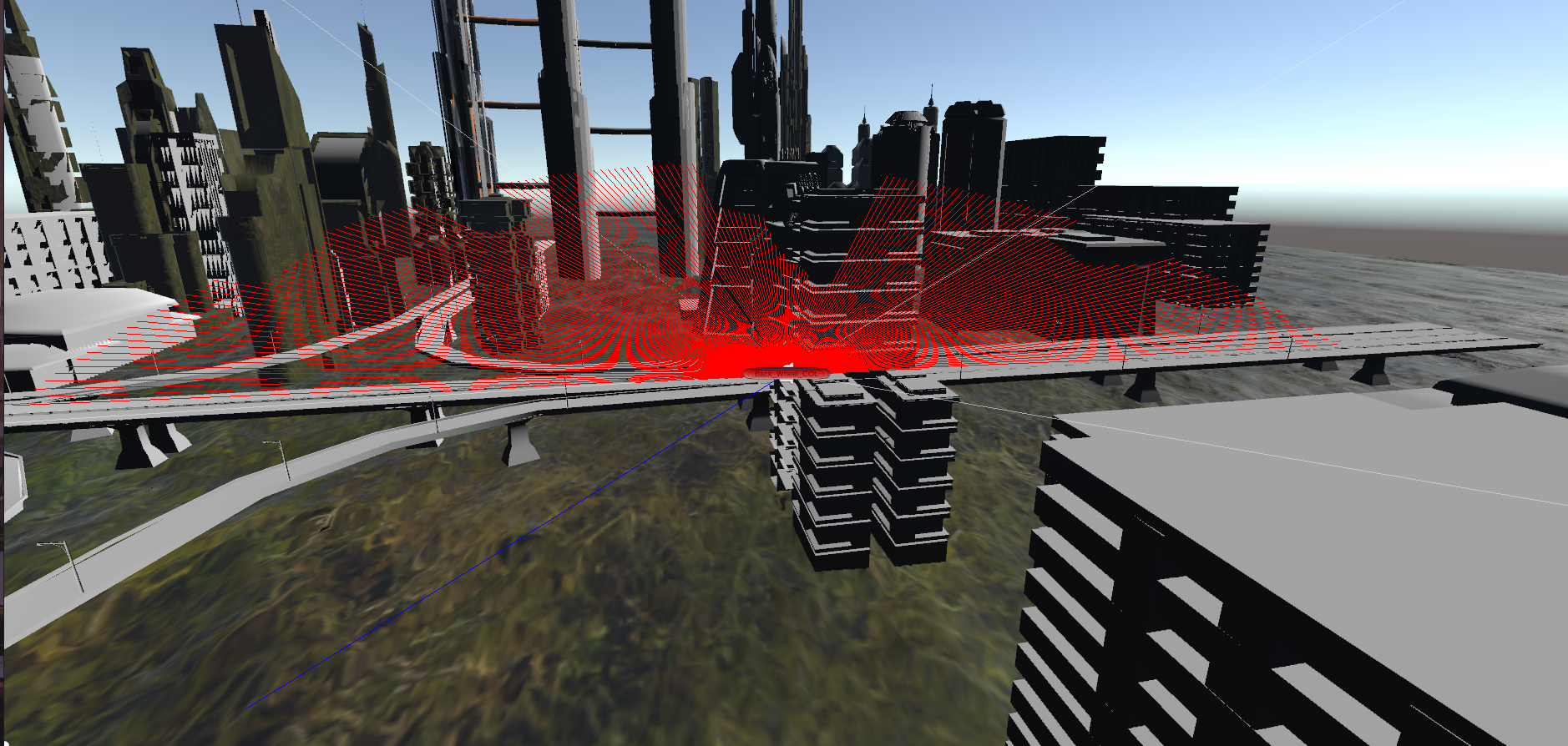
Similarly, lidar interacts with buildings and provides a sense of nearness.